Reading a report
Similarity score, sources, highlighted passages, match sensitivity filters, and viewing a match in its original context.
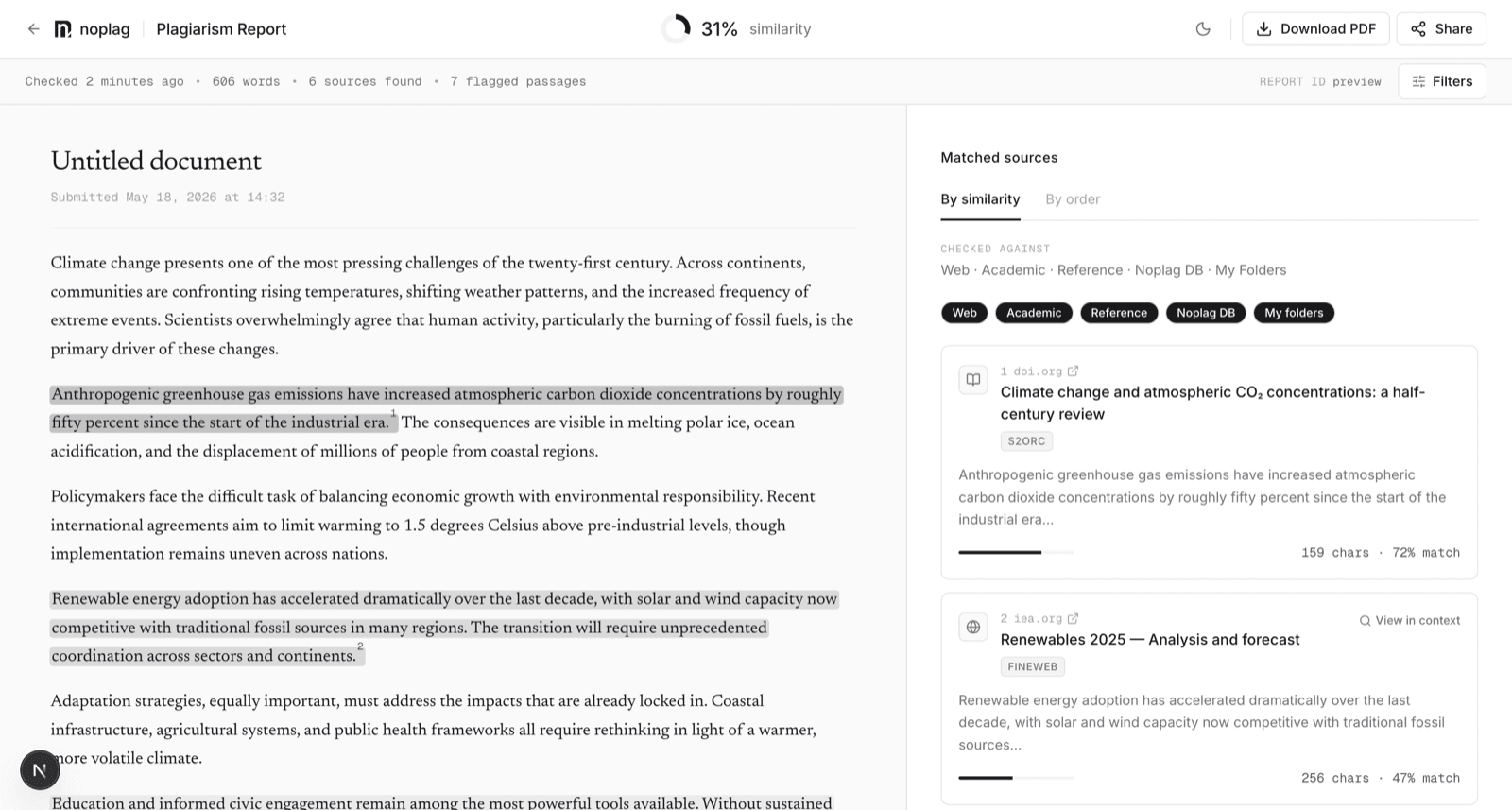
The similarity score
The headline percentage is the share of your text that matched known sources — the deduplicated union of all matched passages, so overlapping matches aren't double-counted.
A score is a pointer, not a verdict
It measures textual overlap: quoted material, common phrases, and properly cited passages all count toward it. The score tells you where to look; the passages tell you what's actually there. See Understanding your similarity score.
Sources
Each matched source is listed with its own match percentage and the number of matched characters. Web sources link out; clicking a source highlights exactly the passages it matched in your document, so you can judge each overlap on its merits.
The panel also shows which corpora the check ran against, and discloses sources that were checked but not flagged — candidates the engine evaluated that scored below the flag threshold. That disclosure exists so "no match" is a statement you can inspect, not a black box. A match against the Noplag Database appears anonymously — match size, never the submitter or the source text.
Highlighted passages
Matched passages are highlighted in your text in three intensities — the stronger the highlight, the higher the similarity of the best matching source for that passage. Clicking a passage links it to its sources, and clicking a source lights up its passages.
View in context opens the matched web source with the overlapping text highlighted in place, so you can see the match in its original surroundings instead of trusting a snippet.
Match sensitivity
The Filters control in the report header lets you tune what counts as a match:
- Ignore matches shorter than… — a word threshold (5, 8, 10, or 15 words). Short incidental overlaps — names, set phrases, boilerplate — stop inflating the score.
- Exclude quoted text — ignore matched passages that sit inside quotation marks in your text.
The similarity score, source list, and highlights all recompute live when you change the filters, and the report states when filters are active. The match sensitivity guide covers when to use each setting.
Coverage honesty
If a very large document hits the per-check time budget, the report says the coverage was partial rather than presenting an incomplete scan as complete. Every match found is still shown.